|
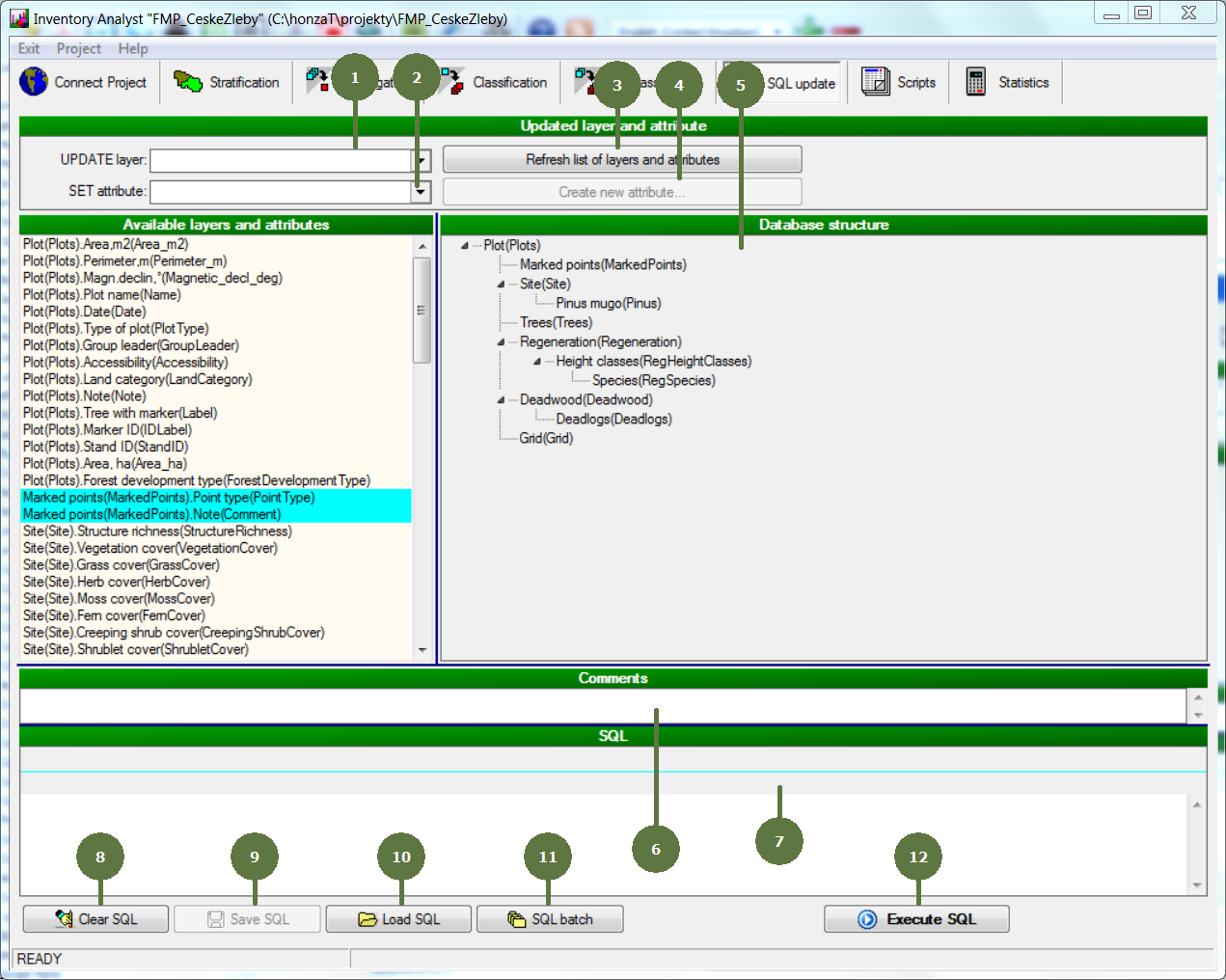
SQL Update form
SQL update: It is possible to use SQL commands to create and calculate derived variables. For example those complex tasks that exceeds the possibilities of classification, reclassification or aggregation. Only “UPDATE” statement is available.
|
- UPDATE layer Select the layer that should be updated by choosing from a list of available layers.
- SET attribute Select the attribute that you want to set a value to.
- Refresh list of layers and attributes Click this button to clear selected UPDATE layer and refresh the list of available SET attributes after creating a new one.
- Create new attribute Besides updating existing attributes it is also possible to define a new attribute that will be appended to the source data table. Fill in the name of the attribute and parameters of the attribute.
- Database structure The selected UPDATE layer is highlighted.
- Comments It is possible to add comments that can be saved together with the SQL.
- SQL The SQL is created based on the selected UPDATE layer and SET attribute.
- Clear SQL Click this button to clear the SQL.
- Save SQL It is possible to store the SQL into a *.sql file for further possible use.
- Load SQL Click this button to load an already prepared SQL.
- SQL Batch Click this button to run SQL Batch or save batch file.
- Execute SQL Click this button to execute the SQL.
|