|
Statistics available in aggregation calculation:
- minimum
- maximum
- count
- total
- sample variance
- standard deviation
- mean
- median
- total area per m2
- total per ha
|
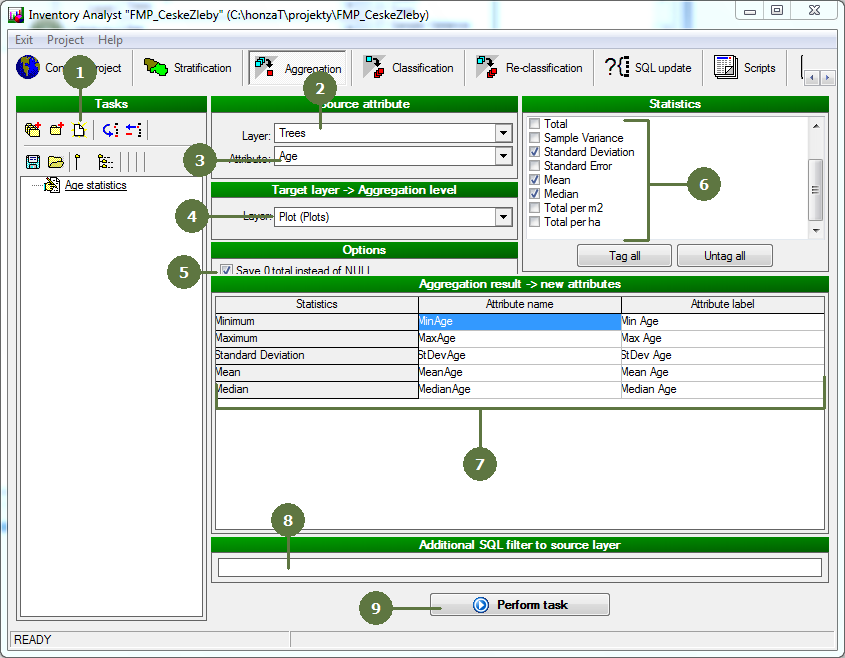
- Add a new task
- Select layer of source attribute
- Select source attribute (i.e. the attribute which statistics will be calculated)
- Select target layer (i.e. layer on which level will be statistics aggregated)
- Set whether replace results of type NULL with 0
- Tag those statistics to be calculated
- For each selected statistic there will be one new attribute created in the target layer and filled with calculation result. You can see a preview of new attributes and optionally, you can change their names and labels.
- Optionally, you can specify SQL query filtering entities of source layer used for statistics calculations
- Click Perform task button
- New attributes are added to structure of target layer containing calculated statistics
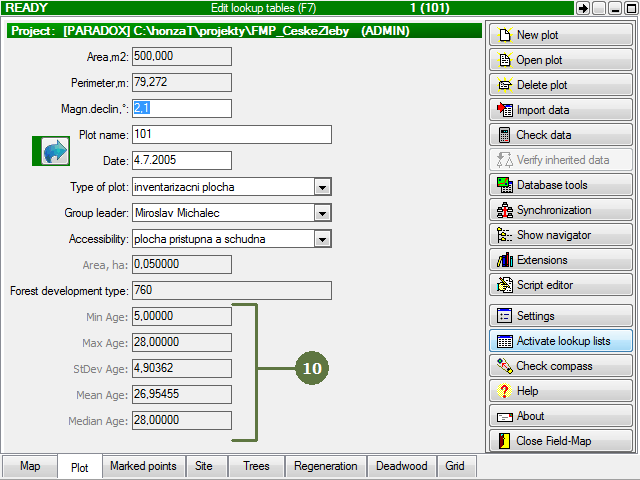
Screen from Field-Map Data Collector
|