|
Classification tool enables classification of measurement data into classes. It converts continuous variable into predefined number of descrete classes. (e.g. age to age classes, tree diameter into diameter classes, etc.)
Classification parameters
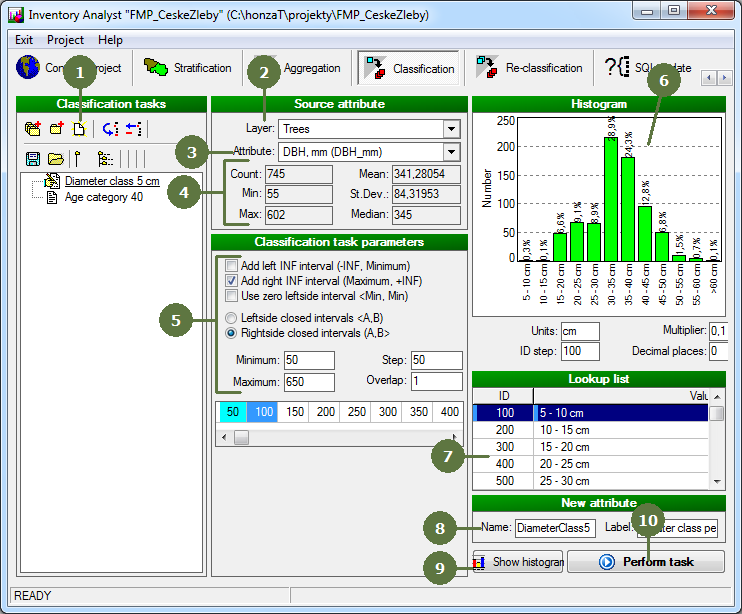
You are able to set -INF and +INF intervals, zero leftsided interval <min; min), left pr rightside closed intervals and span and stem of individual intervals by tagging appropriate button.
|
- Add a new task
- Assign a source layer
- Assign a source attribute (i.e. attribute based on which classification will be based)
- After selecting the source attribute, the list of its basic statistics appears
- Set classification task paramteters
- Preview of histogram appears in the top right corner of window
- Preview of new lookup list (containing defined categories) appeares
- Set the name and the label of new lookup list attribute
- Click Show histogram button to refresh histogram
- Click Perform task button to perform classification
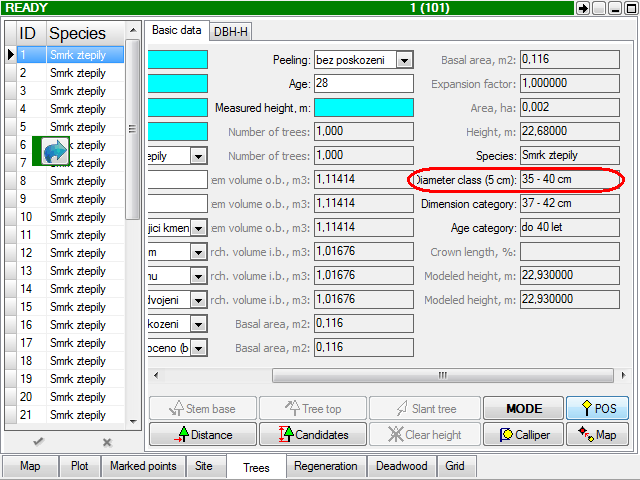
- New lookup list attribute is added to structure of your project
|