- After build polygons function are available buttons (2) for export centroids, if it possible.

A. Export centroids of empty polygons
3. List of empty polygons (without any centroids)
4. Click on the button - Export centroids of empty polygons

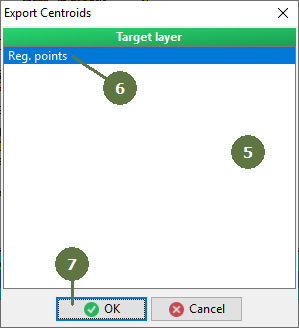
5. A window appears with a list of point layer(s)
6. Select a point layer
7. Click OK
8. If the point layer is not empty then appears a window. Click Yes (empty the point layer and adds the centroid(s)) or No (adds centroid(s) to existing other point(s))

9. You can see in a log window the result
10. Close Polyshape

Centroids has been moved to the point layer.
B. Export Unassigned Centroids
1. Click on the button - Export unassigned centroids

2. A window appears with a list of point layer(s)
3. Select a point layer
4. Click OK

5. If the point layer is not empty then appears a window. Click Yes (empty the point layer and adds the centroid(s)) or No (adds centroid(s) to existing other point(s))

6. You can see in a log window the result
7. Close Polyshape

Centroids has been moved to the point layer.
|
