5.2 Making a task
|
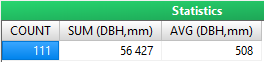
In addition to simple filtering of your dataset, you can have simple statistics of numeric attributes calculated. To perform this, simply select attribute in selection table and click SUM (total)or AVG (average)button. Subsequently, desired statistics appear with query result. For average it is also possible to select whether the attribute will be weighted by another attribute (integer type). For more details, see the chapter Simple statistics (detailed)
Moreover you can order the records of query result using specific column(s) (ORD) and choose between ascending and descending order. Attributes type lookup list and integer can be also group by the same values (GRP). In grouped query task each attribute must be marked either as SUM/AVG or GRP. Repeating consecutive values can be skipped when exporting to Excel (SKIP). However, if the value is to be displayed when changing the value in another attribute, it is possible to activate this control attribute or even combine more control attributes Active plot / all plots When Limit selection to current item of 'Plot' is selected, only records from active plot will be filtered. On the other hand, if No predefined limits for selection is active, all records in database become point of interest for the tool. Using dynamic queries Dynamic query can be accessed by typing of ? symbol (open parameter) instead of definitive value into the respective field in conditions definition. See chapter Dynamic SQL Queries for additional information. |
|