13.23 Showing height candidates list
|
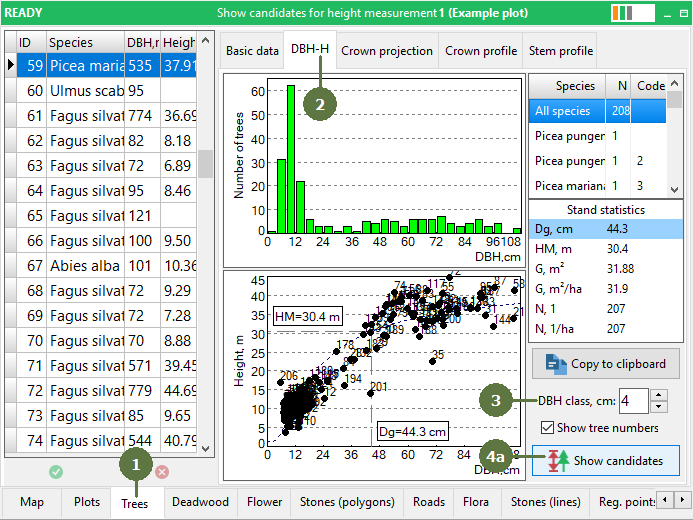
This option helps you to spread height measurements equally across the entire DBH range on the plot. You can choose whether you want to see candidates for one species or for all species on the plot by selecting the appropriate species from the list. The list of candidates has three columns: 1. DBH size class 2. Candidates for height measurement – tree IDs sorted by DBH classes 3. Measured - number of trees already measured in each individual DBH classes The selection of the height candidates for the height curve follows the idea that it is necessary to measure at least four heights (absolute technical minimum for the height curve parameterization) equally distributed along the range of the DBH. Field-Map uses following algorithm and height measurement support functionality:
DBH>Dg+1.5w -> MAX DBH>Dg+0.5w -> LARGE DBH>Dg-0.5w -> MID DBH>Dg-2w -> SMALL
var q :TTableWrapper; v :variant; n :integer; begin q := Tree.GetQueryResult('ID','Status_2019 IN (1,3)'); {1-dead tree; 3-broken tree} try v := VarArrayCreate([0,q.RecordCount-1],varVariant); n := 0; q.First; while not q.EOF do begin v[n] := q['ID']; inc(n); q.Next; end; finally q.Free; end; {pass the information into height candidate selection} Globals.SetGlobalVariable('InvalidTreeIDs',v); end. The conditions/algorithm of the tree selection can be fully adjusted according to the particular methodology and the database structure.
|
First measure all tree positions and download DBH. You can also measure a few heights at random.
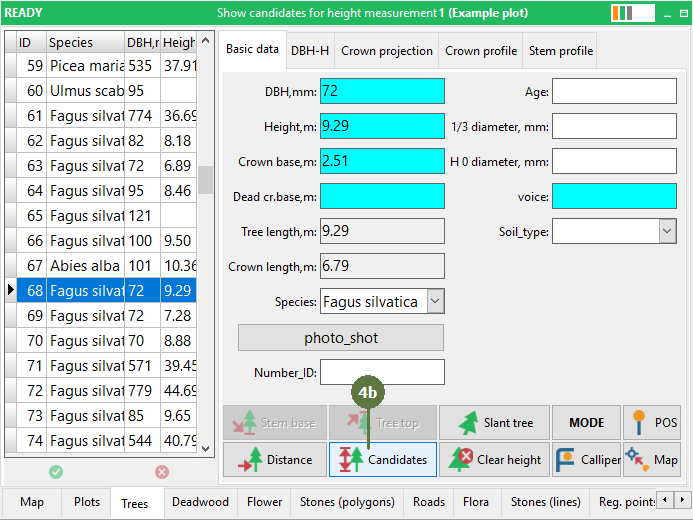
a) Click the Show candidates button b) Click the Show candidates button on Basic data tab - Candidates button
Note: You should measure trees with id that are highlighted green |