|
Switching between a map layer and the relevant data form
You can simply use this function instead of looking for the relevant data form at the bottom panel. It is convenient especially if you work with a project containing many layers.
•A selected record in the data form matches the selected entity in the map
• If no entity is selected in the map, the previously selected on will be activated in the data form
• if more entities are selected in the map, the record with the smallest ID will be activated in the data form
Switching options:
- click relevant form in bottom panel
- click floating button
- click on plot name in status bar
- push F8 shortcut
|
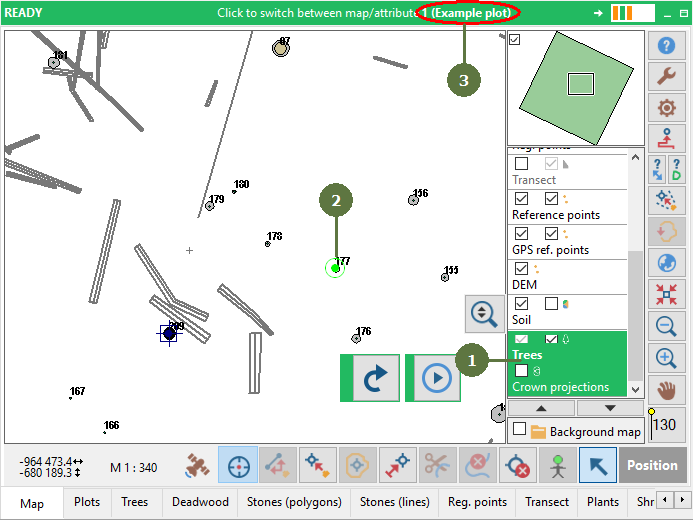
- Make a layer active
- Select an entity in the map
- Click on the right part of the status bar (plot name) to view the relevant data form
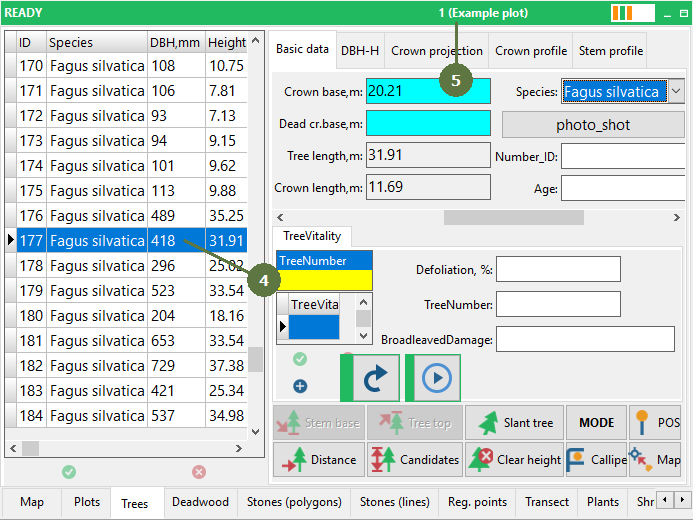
- A data form appears where the relevant record is automatically selected
- Click on the right part of the status bar to go back to the map
|