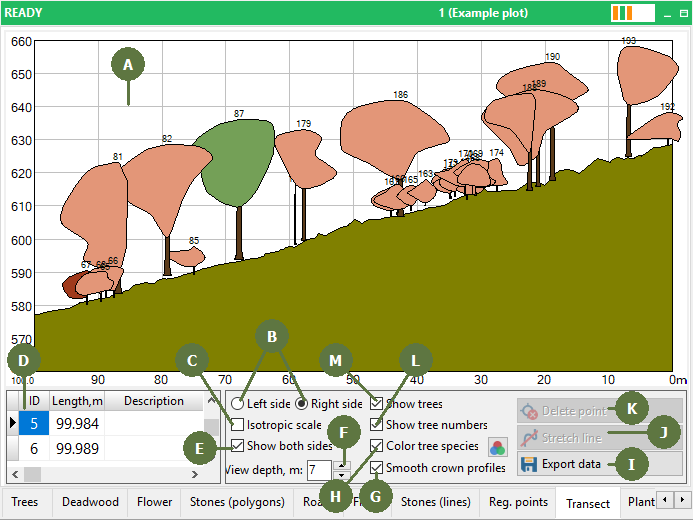
The Transect view is used for the visualization of vertical crown profiles. It is very useful for showing the vertical structure of the forest.
The side view can be changed using the radio buttons.
For displaying transect in isotropic scale, tag this check box.
Several transects can be measured on one plot. Select the one you want to display in the List of measured transects. Here you can also add description to each transect.
For Showing both sides of the transect tag this check box.
The depth of the view is defined in the View depth edit box.
Smooth crown profiles by tagging this check box.
For highlighting trees species tag Color tree species check box. You can also change the colors of trees.
You can export transect to Windows Metafile or Enhanced Metafile format by clicking the Export picture button. You can Export data to file or you can copy data to clipboard (point, distance, coordinate: z,x,y).
The line of the transect can be extended by selecting the Stretch line button.
The Delete point button is used for deleting any of the measured points on the transect.
Tree ID can be shown on the transect by tagging Show tree numbers check box
Trees can be shown on the transect by tagging Show trees check box.