|
Total area
If First plot with inventory grid is tagged, Inventory Analyst automatically retrieves total area. Otherwise, the area has to be filled manually or can be obtained from the map (shapefile).
Plot area
If there are plots with variable sizes, "Variable" option together with a span of areas of individual plots appears in the box.
Language
There are more language options in Statistics part of Inventory Analyst. Outputs can be even bilingual.
Modelling of plot selection
This option is used to randomly select subset of plots. A user can define intensity of the selection in percent. Marker attribute is used to filter set of plots.
|
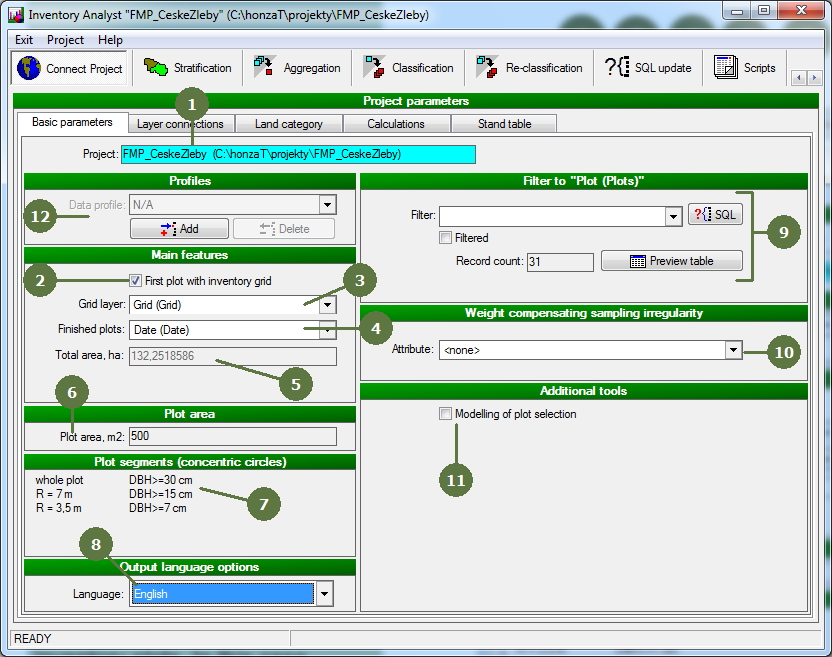
- Directory to currently opened project appears at the top of the tab.
- Tag this field, if the project includes the plot with inventory grid
Note: The layer with inventory grid has to have the smallest ID of all other plots in the project.
- Choose the layer which contains inventory grid
- Choose the attribute of layer Plots, which indicates whether the plot was finished or not
- Total area of plots in your project
- Area of inventory plots is automatically retrieved from the database
- Information about plot segments, if any.
- Choose the language of your outputs
- It is possible to calculate statistics only for subsample of plots defined by SQL queries.
- You can compensate sampling irregularity by using weighting attribute.
- Tag Modelling of plot selection to use modelling procedures to randomly select subsamples of plots.
- You can create and save data profile for further use, when data relating to different stratum are to be analyzed separately.
|