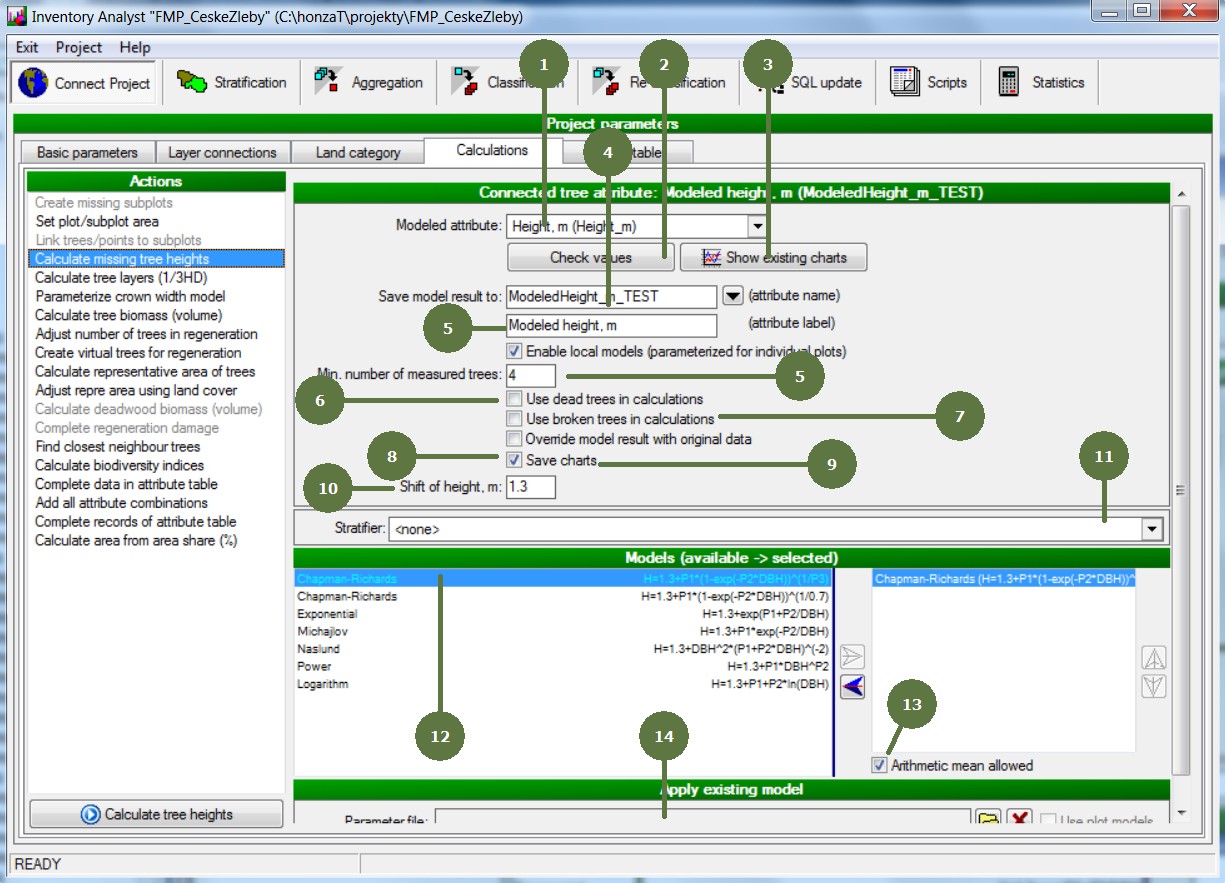
4.8 Calculate missing tree heights – form
|
1. Modeled Attribute Choose the attribute that should be calculated. The principle of calculating is the same. 2. Check Values Press this button to check missing heights. The result appears in a dialog window 3. Show existing charts Press this button to preview existing charts 4. Save model result to Enter the name and the label of the new calculated attribute containing the modelled height 5. Min. number of measured trees Enter the minimal number of trees that are necessary to parameterize the local model. If there are fewer trees than the minimal number, the local model is not used; the model based on measured heights of same species regardless location of samples is used instead. 6. Use dead trees calculations Decide if dead trees should be used. Dead trees have to be properly defined in the Connect project section 7. Use broken trees calculations Decide if broken trees should be used. Broken trees have to be properly defined in the Connect project section 8. Override model result with original data If checked, modeled heights will be replaced by measured heights when the measured heights exists 9. Save charts Press this button to save DBH-H charts+ 10. Shift of height, m will be added to the equitation as an „offset”, if the model does not work with the height in zwhich the DBH was measured. 11. Stratifier It is possible to use a stratifier 12. Models List of models that will be used to calculate missing heights. Choose the models you want to be used in the calculations from the list of available models (left window) and use the arrows to move them to the selected models (right window). If the chosen model fails, the next one from the list is preceded. 13. Arithmetic mean allowed Arithmetic mean is the simplest model, thart can be used in case of minimal differences in measured heights.
|