|

|
4.18 Adding a conditional lookup lists attribute
|


|
Working with layer attributes > Adding a conditional lookup lists attribute
|
Principle of conditional lookup list
Conditional lookup lists are one of many Field-Map features assuring the consistency of a database. It is often the case that we collect data for specific objects only if they meet the defined criteria. For this purpose we recommend the “Conditional lookup list” attribute type.
|
- Click the Add new attribute button in the Navigation toolbar.
- Type the name of the attribute in the Attribute name field.
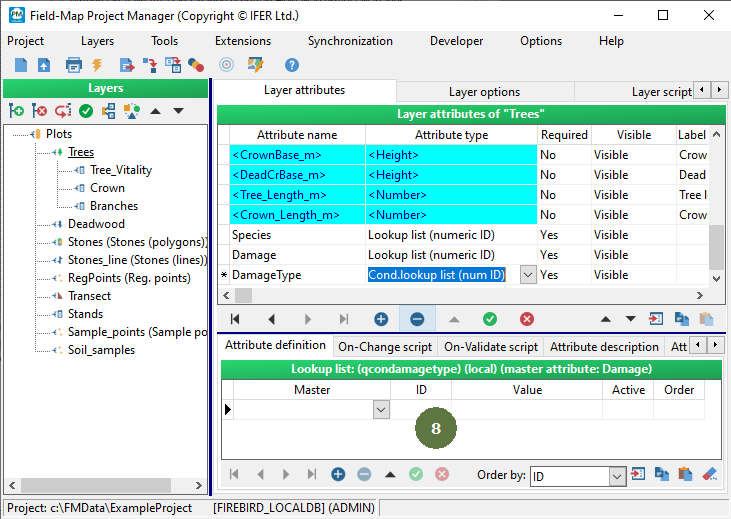
- In the Attribute type field select Cond.lookup list (num ID).

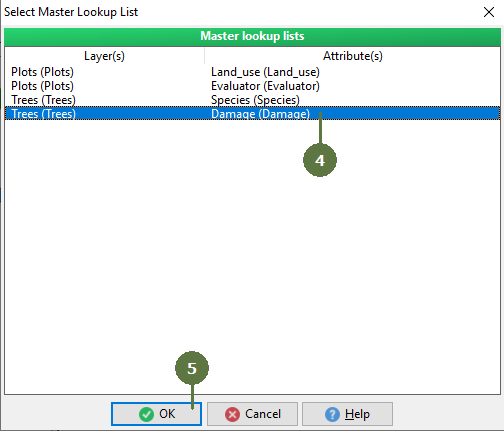
- Select the appropriate master lookup list.
- Click OK.
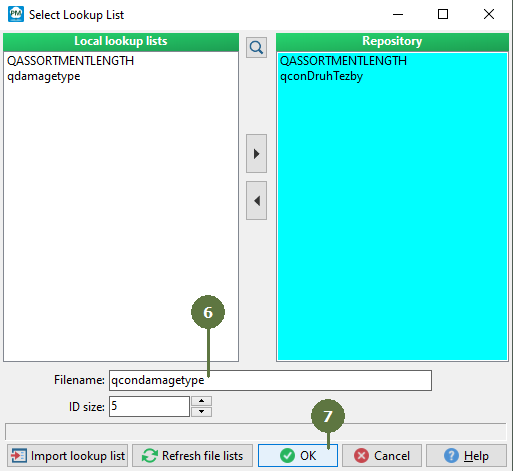
- Type the name for the new conditional lookup list in the “Filename” edit box.
- Click OK.
- A blank lookup list appears.
|
© 2024 IFER Monitoring and Mapping solutions, Ltd.