|

|
4.17 Importing lookup items from an external table
|


|
Working with layer attributes > Importing lookup items from an external table
|
Importing lookup lists from external tables
Use this function to import lookup list items into the already existing lookup list.
Note:
An importing procedure is analogous to the (previous) Importing lookup lists chapter, in addition, in case of existing lookup lists, theImport lookup list from external table button is available.
|
- Choose the lookup list attribute you want to import items to.
- Click the Import lookup list from external table button.
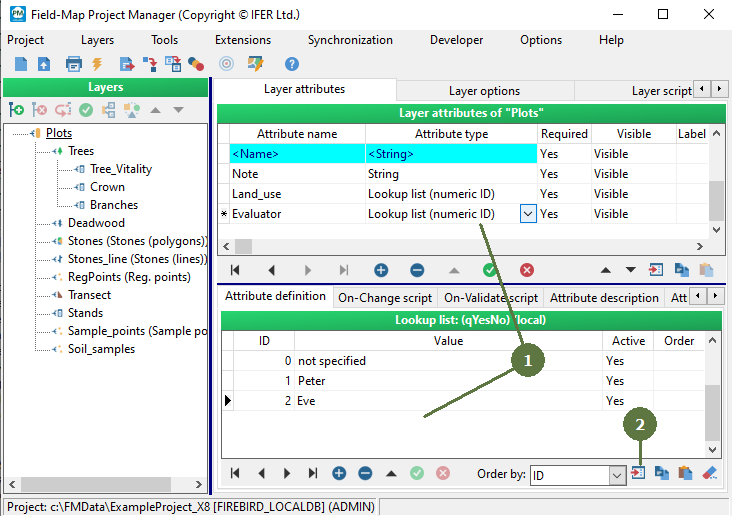
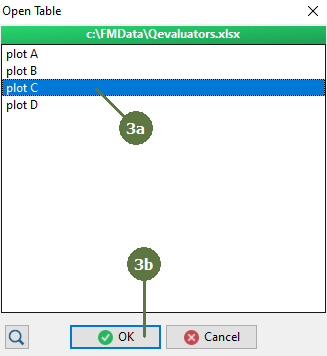
- Choose the table that you want to import.
a) In case of database files or workbooks select table or sheet
b) Click OK
- Table preview appears in the dialog box.
- Select the field which represents the lookup list ID fields(In case of GUID lookup table, select Value field).
- Select the field which represents the lookup list Value (and Value1, Value2, if any) fields.
- Select the field which represents the lookup list custom Order field.
- Click OK button.

- The lookup list items have now been imported.

|
© 2024 IFER Monitoring and Mapping solutions, Ltd.