3.10 Moving layers


Working with layers > Moving layers
|
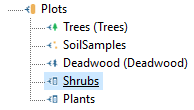
This feature may be interesting when you want to set the order in which data is collected. For example, a field worker should first assign data to map layers (Trees, Soil samples and Deadwood) and then to data layers (Shrubs and Plants). In such case you will move the “Shrubs” layer just above “Plants” as demonstrated below. The layer order is conveyed to Field-Map Data Collector tab order (see the example below). before:
Screenshot from Field-Map Data Collector:
after:
Screenshot from Field-Map Data Collector:
|
|