|
Attribute defining row color and font of overview grid
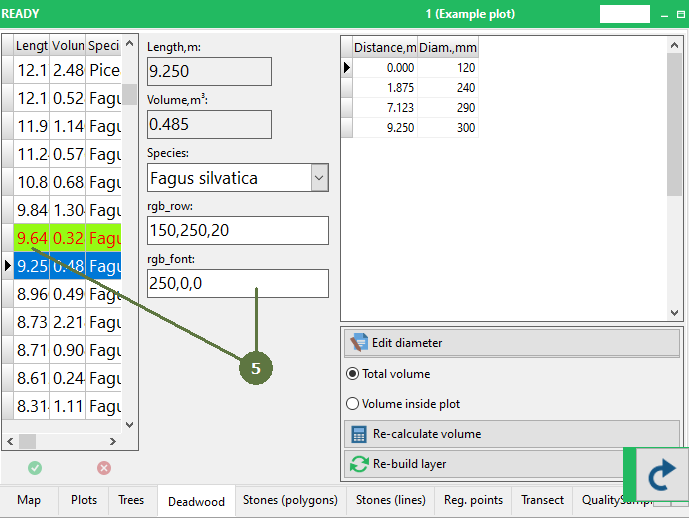
Any map entity/data record is represented by a corresponding row in the overview grid. The background color of the row as well as font color of a particular entity can be controlled by a user via the value of a specific attribute in the corresponding layer. The value of the attribute can be set either by hand or automatically by a user defined script. The script can either set the value of a required color directly using its red/green/blue components, or the attribute can have a lookup list associated. In this case, the lookup list contains a list of predefined colors and the script selects particular color by the ID the color has in the lookup list.
The attribute for controlling the color can be set in Layer options. Only the attributes of a string type having size exactly 11 are listed and can be selected. The value of a color is coded as ‘R,G,B’ where R,G,B are red, green and blue components respectively. Each of the components can be in range 0 - 255 so the maximal length of the value of this attribute is 11.
For example the value of ‘44,224,29’ will turn the row to appear green.
Setting overview grid appearance
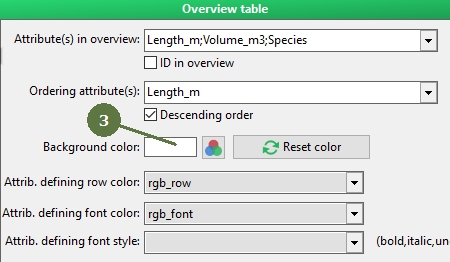
By default, background of overview grid has white color, but you can set other colors for individual layers. Moreover, different entities of one layer can have different background and font colors and font styles in overview table.
Note
If you want to clear the attribute defining the row color setting, click DELETE and ENTER when scrolling drop-down menu.
|
- Create new attributes of string format having size exactly 11, which will serve to set color and font of individual entry in overview table.
- Switch to Layer options tab

- Set the color of overview table background (optional)
- Assign attributes to their definition
Run Field-Map Data Collector
- Background of layer overview table changes to selected color
screenshot from Field-Map Data Collector
|


