3.3 Adding a layer from template


Working with layers > Adding a layer from template
|
A template can contain also its own lookup lists, symbols and scripts to bring a new functionality to a project. Note: Each template allows you to add one main data layer together with corresponding child layers. The names of new layers are already predefined in the template but they can be changed if necessary. You can freely rename the main data layer created from the template. Underlying data and GIS layers can be renamed too. Their names consist of the name of the main layer followed by underscore (optional) and the name of a child layer from the template. Formatting Use FieldMapProject.xml as a guideline for the desired layers. There always has to be one core layer. |
|

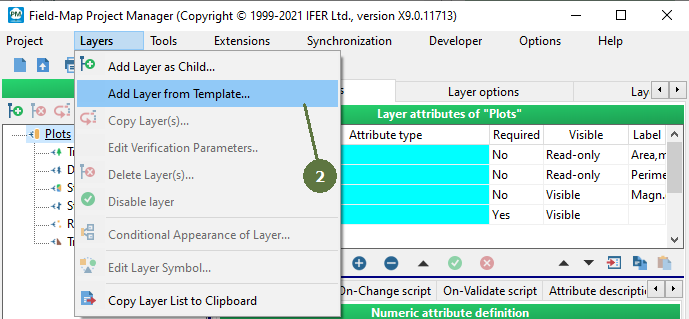
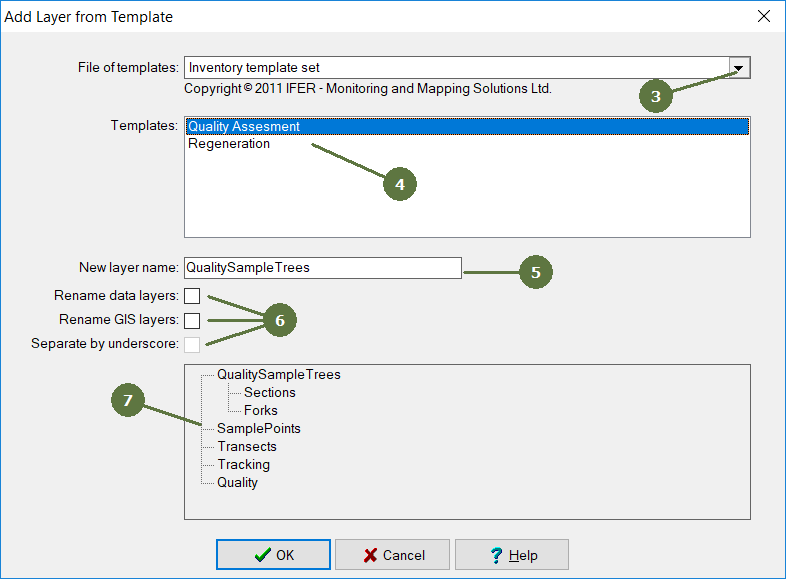

Defining a template file
Templates are stored as XML file in c:\Users\Public\FieldMap\Templates\. You can copy layer definition from existing project metadata. There has to be one always one core layer. To obtain lookup tables structure use export. The structure is as follows:
<FIELDMAPTEMPLATES CAPTION="template set name" COPYRIGHT="your copyright">
<TEMPLATE NAME="layer template name" CAPTION="shown caption">
<CORELAYER>
<LAYER >
<ATTRIBUTES>
<ATTRIBUTE NAME />
<SCRIPTS>
<SCRIPT></SCRIPT>
</SCRIPTS>
</ATTRIBUTES>
</LAYER>
</CORELAYER>
<GISLAYERS>
<LAYER >
<ATTRIBUTES>
<ATTRIBUTE />
</ATTRIBUTES>
</LAYER>
</GISLAYERS>
<LOOKUPTABLES>
<LOOKUPTABLE />
<ITEM />
</LOOKUPTABLE>
</LOOKUPTABLES>
</TEMPLATE>
</FIELDMAPTEMPLATES>