6.3 Classification


Data processing tools > Classification
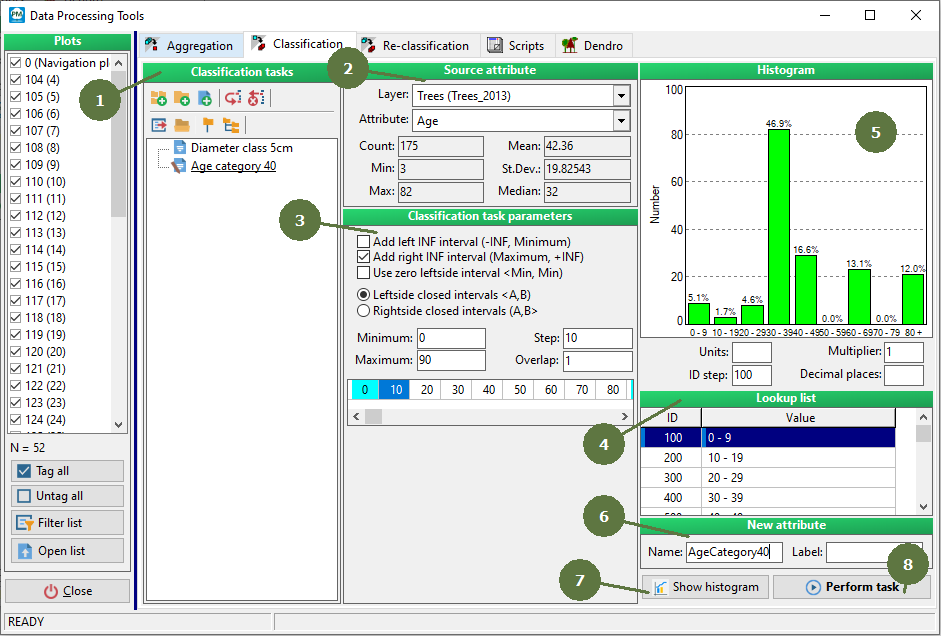
- Classification tasks
Each defined classification task can be saved for possible further use. The filename extension of the saved classification tasks is cla.
Tasks can be organized into groups and subgroups. Add group
 Add subgroup
 Add task
 Copy task
 Delete group/task
 Export task
 Import task
 Full collapse
 Full expand
Full collapse Full expand

- Source attribute
The source attribute is the attribute to be classified.
Select the layer and the attribute of the selected layer by choosing from the list of available layers and attributes. - Classification parameters
Classification parameters define the classes.
It is possible to set the range and the margins of intervals. Project Manager automatically shows the classes. - Lookup list
A list of the classes based on the classification parameters. It is possible to import a list of classes that have already been created. - Histogram
Histogram of calculated classes.
It is possible to set / change parameters of the histogram to be shown: units, decimal places and a multiplier.
- New attribute
The new attribute will be appended to the source data table and it will contain the information about the calculated classes. Fill in the name of the attribute and the label. - Show histogram
Click this button to show / refresh the histogram. - Perform task
Click this button to store the new attribute with the new classes in the source layer data table.